

Garmin Xero C1 Pro: Chronograph setup made simple
Sometimes wishes really do come true.
A few years ago I was setting up my optical screen chronograph at the local SSAA range. It was a fairly involved process designed to ensure repeatability between sessions. I always used the same bench and placed the chronograph at exactly the same position, height and orientation.
A fellow I knew was watching and commented that I was going to a lot of trouble. I explained that by replicating the exact setup each visit, I could eliminate slight measurement variations between sessions. He said he wanted a chronograph too but was holding out for one that didn’t require screens – something the size of a packet of smokes, cordless, fully automatic and simply placed on the bench beside the rifle. I wished for that as well, but assumed it was still a long way off.
As it turned out, we didn’t have to wait long – Garmin introduced the Xero C1 Pro Chronograph, exactly as we had imagined. It quickly proved revolutionary and built a strong following.

Garmin Australia provided Australian Hunter with a Xero C1 Pro for review. Inside the box were the device, a tiny stand, a USB Type-A to Type-C charging cable, warranty paperwork and a condensed user guide. The full user manual can be downloaded from garmin.com/manuals/xeroC1 for those wanting more detail.
The stand uses a standard ¼-20 thread mount, making it compatible with most photographic tripods – potentially useful for measuring arrow velocities. With dimensions of only 77 x 60 x 32mm, the Xero C1 Pro is truly pocket-sized, and at just 105g it feels almost weightless. Its operating temperature range of -10C to 55C keeps it well within my range-day comfort zone.

The device is fully sealed to IPX7 waterproof standard and uses an integral rechargeable lithium-ion battery. It’s remarkable that something this small can log up to 2000 shots or provide six hours of continuous use on a single charge – especially while emitting a constant stream of radio waves.
The Xero C1 Pro uses Doppler radar to detect and analyse the change in frequency of radio waves reflected off projectiles in flight. It operates on a 24GHz continuous-wave radar system and can reliably measure velocities from 100-5000fps. Large, slow projectiles such as arrows, airsoft and slingshot pellets are easily captured. Air rifle pellet speeds can be measured using the dedicated Air Rifle mode, which handles velocities up to 2000fps.
One important point is that the device requires at least 20yds of projectile flight path for reliable detection, so ensure your backstop allows for that distance.

The Xero C1 Pro delivers comprehensive statistical data for each session. It links via Bluetooth to your smartphone, and Garmin’s free ShotView app offers cloud storage along with the ability to export CSV files for use on a personal computer. The device provides velocity, average, minimum, maximum and standard deviation. If you enter bullet weight when prompted, it will also calculate energy. The bright display is easy to read in full sunlight and key data fields can be customised.
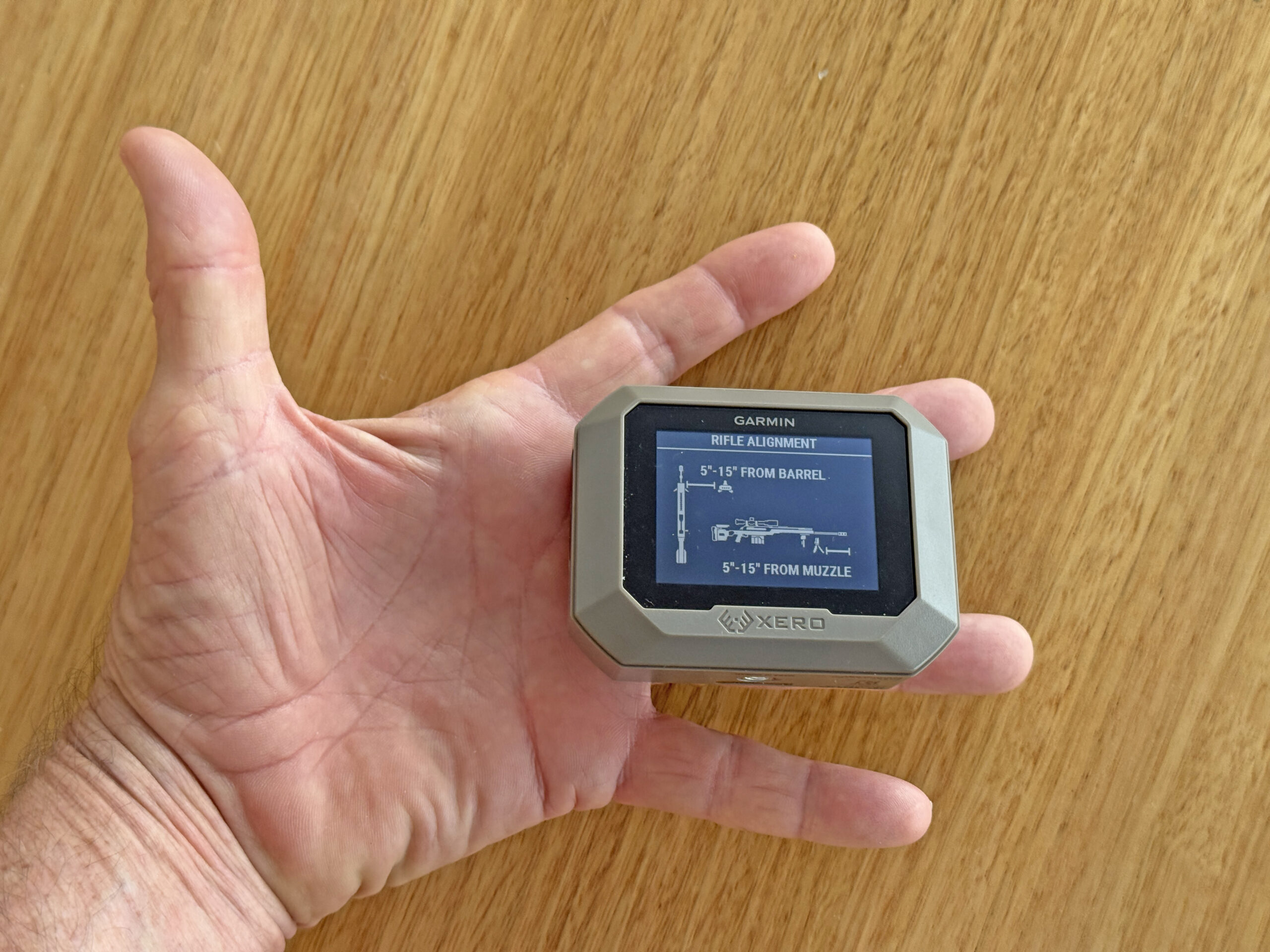
The settings menu offers options for language, measurement units, connectivity, data fields, backlighting, display colour, pro settings and reset functions. Pro settings allow you to disable the alignment diagram, turn off bullet-weight prompts and activate Downrange mode. Downrange mode lets the device measure velocity at selected distances from the muzzle, with the screen flashing five times to confirm a successful reading. This is particularly useful for anyone wanting precise trajectory velocity data. The device must be positioned within 5-15″ of the projectile’s path, so considerable care is required.
Using the Xero C1 Pro couldn’t be simpler. When switched on, the display prompts you to choose a new session, historical data or settings. Selecting ‘new session’ allows you to choose whether you are measuring rifle, pistol, bow, air rifle or other projectiles. For rifle use, you next select the appropriate velocity range: 1700-5000fps or 600-1700fps. You’re then given the option to enter projectile weight.
A graphic then appears showing the correct positioning of the Xero C1 Pro relative to a nominal rifle – 5-15″ behind the muzzle and 5-15″ to one side of the barrel. For pistol and bow measurements, the positioning is 5-15″ above the device and directly in line. Select OK to begin your session. A single button press ends recording and returns you to the home screen.
Safe travels
So, you’ve invested in the Garmin Xero C1 Pro Chronograph – a revolutionary, tiny device. It’s simple to use and conveniently small, making it perfect to take along on bush trips.
But you don’t want that little device rattling about in your gun box. For a while I simply kept mine in a small plastic container, until I discovered a range of robust carry cases specifically for the Xero C1 Pro. I opted for the BOVKE version of the Garmin Xero C1 Pro carry case for $30. I feel much better about taking the chronograph out bush, and $30 seems a small price to pay to protect a thousand-dollar investment.
As always, there are other options worth exploring, whether at your local gunshop or online.

Garmin lists a RRP of $1099 for the Xero C1 Pro.
Share this article

Related
Articles


What to carry hunting: Essential gear for safety and success


Related
Recipes
Sorry, no related items found.